Shopping List - Simple & Easy
- 4.5
- Rating
- 1.00M
- Installs
- Free
- Price

 Analysis by App-foxy
I like shopping-list apps that stay out of the way. When I am standing in a supermarket, I do not want a complicated planning system, a social feed, or a long setup process. I want to open the phone, see what I need, add something quickly, and remove it when it goes into the basket. Shopping List - Simple & Easy is built around that straightforward idea. It is a free shopping app from Opulogic Inc, aimed at people who want a digital replacement for a note in their pocket.
That simplicity is both its strongest quality and the main question you need to ask before installing it. The app is not trying to be a complete household-management platform. Its store summary presents it as an easy grocery and shopping list for a phone, and my impression is that this narrow purpose is important: it can be useful precisely because it does not ask you to learn a large system before making a list.
What the app feels like in everyday shopping
My preferred way to use an app like this is before leaving home. I walk through the kitchen, notice that rice is nearly finished, remember that I need detergent, and add both items immediately. Later, when I am in the shop, the list becomes a small checklist rather than a memory test. That workflow suits Shopping List - Simple & Easy well because the central task is clear: record items and keep track of what still needs to be bought.
You May Also Like

 Blood Strike: 2.5 Anniversary
Blood Strike’s Loadouts Turn Every Drop Into a Tactical Gamble
A close look at Blood Strike’s custom loadouts: how fast access to signature weapons reshapes its battle royale rhythm, rewards preparation, and narrows the gap between fights.

 Pandora - Music & Podcasts
Pandora’s Music Is Easy to Start, but Harder to Recover
Pandora’s strength is its low-effort path from a seed to a station. Its weak spot is how much confidence it asks you to place in connection, setup, and quiet recovery.

 8 Ball Pool
 Is Built on Rivalries, Rematches, and Routine
A close look at the rivalries, rematches, shared routines, and unanswered safety questions that turn a quick pool match into a persistent mobile community.

 Samsung Music
’s Quiet Strength Is Playing What You Already Own
Its reach comes less from spectacle than from dependable access to a personal library. That simplicity is both the app’s strongest retention engine and its ceiling.

 AccuWeather: Weather Radar
AccuWeather Review: A Quick, Clear Forecast for Everyday Decisions
For everyday plans, the best forecast is the one you can understand quickly. AccuWeather makes rain timing, radar, and local conditions easy to act on, with a few trade-offs.

 Hill Climb Racing
Why Hill Climb Racing Still Turns Crashes Into One More Run
A tiny car, a bumpy hill and one more upgrade: Hill Climb Racing keeps resurfacing because its simple chaos makes every near-miss feel personal.
More From Our News Desk



A realistic example is a quick midweek supermarket trip. I might open the list while checking the refrigerator, enter milk, vegetables, coffee, and bin bags, then keep the phone visible while moving through the aisles. Each item has a practical purpose, and a simple list is often better than a feature-heavy app when the shopping trip itself is already busy. The value comes from reducing the chance that I will forget one small but necessary item.
I also find this type of tool useful for errands that are not strictly groceries. A list can cover pharmacy items, cleaning supplies, stationery, or ingredients for a single meal. The store description calls it a grocery and shopping list, so I would treat it as a general checklist for purchases rather than a specialist meal-planning service. That distinction matters if you expect recipes, nutrition information, or automatic grocery suggestions.
The app is available at no charge, which makes the decision easy for someone who only needs a basic list. It also includes in-app purchases priced at $1.99 per item and $2.99 per item. Those purchase options mean the free starting point is the central value proposition, while any paid value should be judged by whether the extra convenience matters to your particular routine. I would not install it assuming that every function is necessarily included in the free experience; I would check the purchase screen before paying and make sure an optional upgrade solves a problem I actually have.
That is a healthier way to think about the cost. The app does not need to replace a paid productivity suite to be worthwhile. If it saves me from forgetting a few items during ordinary shopping, free access may already be enough. On the other hand, someone expecting advanced organization should compare the available paid options with dedicated alternatives before spending anything.
A small app is useful when the habit is reliable
The most important feature in practice is not a decorative one. It is whether I remember to put the item into the list at the moment I think of it. I recommend adding things immediately instead of trusting memory until the shopping trip. A missed entry cannot be fixed by a beautifully designed checklist. Keeping the app on the first screen of the phone, or opening it as soon as I notice something is running low, turns it into a more dependable routine.
Another useful habit is to build the list in the order I expect to shop. Even without treating the app as a full store-navigation tool, arranging items in a sensible sequence can reduce backtracking. I might group fresh food together, then household products, then personal-care items. This is a manual step, but it gives a basic list more practical value than simply entering items in the order they come to mind.
I would also avoid creating a single enormous list for every possible future purchase. A long list becomes difficult to scan, especially when some items are urgent and others can wait. For a weekly shop, I would keep the active list focused and remove completed or no-longer-needed entries promptly. That makes the app feel faster even though the underlying task is simple.
There is a useful trade-off here. A minimalist list gives me less to manage, but it also gives me fewer built-in safeguards. If I need quantities, brands, substitutions, dietary notes, shared household editing, or recurring reminders, I should not assume that a basic shopping-list app will handle those needs in the same way as a specialized service. The right choice depends on whether I want a quick checklist or a complete purchasing workflow.
How it compares with paper notes and larger shopping apps
Compared with a paper note, the obvious advantage is that the phone is usually already with me. I do not need a pen, and I can update the list while away from home. The disadvantage is that a phone can introduce its own friction: unlocking it, finding the app, and dealing with distractions can take longer than writing one word on paper. For a very short purchase, paper may still be faster. For a list that changes throughout the day, the digital format is more convenient.
Compared with a general notes app, Shopping List - Simple & Easy has a more focused purpose. A notes app can store lists, but it may mix groceries with work notes, reminders, and copied information. A dedicated shopping tool makes the list feel separate and easier to use during an errand. That focus is valuable for someone who wants fewer decisions, although a notes app may be better for people who already have a well-organized system and do not want another application.
Compared with feature-rich grocery platforms, this app appears better suited to users who do not need shared carts, recipe imports, price tracking, loyalty integration, or detailed pantry management. Larger services can be better for families coordinating purchases or for shoppers who plan meals several days ahead. Their extra capabilities can also make them slower to maintain. I would choose this app when the main problem is forgetting items, not when the main problem is managing an entire household’s food system.
The developer is Opulogic Inc, and the app has reached over one million installs with an average rating of 4.5 from around twenty-seven thousand ratings. Those figures suggest that the simple approach has found a substantial audience, but they do not remove the need to decide whether its level of organization matches my own habits. Popularity can reassure me that the concept is established; it cannot tell me whether I personally need more advanced tools.
What I would check before relying on it
Before making it the only place where I store an important shopping plan, I would spend a few minutes testing the basic workflow. I would create a temporary list, add several items, mark them as completed, close the app, and reopen it. I would also check how comfortable it is to edit an item after entering it incorrectly. These are small tests, but they reveal whether the app fits the speed of real shopping rather than merely looking acceptable in a store preview.
I would pay special attention to how the list behaves when it becomes longer. Four items are easy in almost any checklist. A large weekly shop is different. If scanning, editing, or clearing completed entries feels awkward, I would either shorten the list or choose a more structured alternative. This is one of the main limitations of a simple tool: the interface may be pleasant for small errands while becoming less helpful as the amount of information grows.
I would also decide how I want to handle shared shopping. If one person prepares the list and another person does the shopping, a basic app may not provide the same coordination as a service designed around shared lists. In that situation, I would look for a clear sharing workflow before treating the app as a household solution. If I am the only shopper, that concern is much less important.
Version 3.14 is the current version, and the app supports devices running Android 8.0 or later. That makes compatibility a practical point to check before downloading, particularly if an older phone is still in use. The content rating is Everyone, so it is presented as suitable for a broad audience. I still prefer to test the experience on the actual device I plan to carry around the shop, because screen size and typing comfort can affect a list app more than its feature count suggests.
Where the free option delivers enough value
For a student, a single-person household, or anyone making short grocery trips, the free access may be all that is needed. I can see the value in keeping a short list of essentials, especially when purchases are spread across the week. The app is also a reasonable fit for someone moving from paper to a phone but feeling overwhelmed by productivity software. Its purpose is easy to understand, and that lowers the barrier to forming a useful habit.
It can also work well for occasional shoppers. I do not need to learn a complicated system for a list I create only once or twice a month. A focused app is easier to justify when the task is occasional and the cost of forgetting an item is more annoying than the effort of entering it.
The paid items need a more personal assessment. At $1.99 to $2.99 per item, they are not a major purchase in isolation, but value still depends on what they unlock and how often I use the app. I would pay only for a clearly useful convenience, not simply because an upgrade is visible. If the free experience handles my normal list, keeping the money in my pocket is the sensible choice. If a paid option removes a recurring annoyance, it may be reasonable, but I would evaluate it as a small convenience purchase rather than an essential expense.
The best value here is dependable simplicity, not a promise of a full grocery-management system. That is why I would recommend it to someone who wants a clean digital checklist and not to someone who already knows they need automation, collaboration, or detailed planning.
Who should choose something else
I would look elsewhere if my shopping depends on recipes and quantities. A meal-planning app can connect dishes to ingredients, while a basic list requires me to enter and maintain those details myself. The same applies to shoppers who compare prices across stores or want a record of spending. A simple checklist helps me remember what to buy, but it is not automatically a budgeting tool.
Families should think carefully about coordination. If several people regularly add items, remove them, and shop at the same time, shared editing can be more important than a clean individual list. I would choose a family-oriented alternative if the household needs a single live list that everyone can update reliably.
I would also skip it if I dislike typing on a phone or if my lists are usually very detailed. The app’s appeal depends on low effort. When entering every item requires brand, size, quantity, and special instructions, the process may become less simple than the name suggests. In that case, a more structured grocery manager could save time despite having a steeper learning curve.
People who want reminders, recurring purchases, or a pantry inventory should compare those needs against the app before committing. I do not want to turn a straightforward list into a manual database. The more information I expect to track, the more likely it is that a specialized alternative will offer better long-term value.
My recommendation after weighing the trade-offs
I would recommend Shopping List - Simple & Easy as a practical starting point for Android users who want a free shopping checklist and do not need a large collection of planning tools. Its broad Everyone rating, established install base, and focused purpose make it easy to consider for ordinary errands. The developer, Opulogic Inc, has kept the product positioned around a familiar need rather than asking every shopper to become a productivity expert.
My recommendation comes with a clear condition: keep the list short, maintain it as soon as needs arise, and test the workflow before depending on it for a major shop. Those habits make the simple design work in its favor. If I need shared household planning, recipe-based lists, price comparison, or detailed spending control, I would choose a different category of app instead of expecting this one to grow into something it was not designed to be.
For me, the buying decision is straightforward. I would start with the free version, use it for a few real shopping trips, and ignore the in-app purchases unless one of the options solves a specific problem. Since the app itself is free, there is little financial risk in trying it, while the paid value should be judged carefully rather than assumed. That makes it a sensible recommendation for simple needs, but not an automatic replacement for every grocery tool.
In the end, Shopping List - Simple & Easy succeeds when I treat it as a focused reminder system. It helps turn scattered thoughts into a list I can carry through the shop, and that is enough for many people. I would choose it for quick personal errands and uncomplicated weekly shopping. I would skip it when shopping has become a shared, planned, price-sensitive project that needs more structure than a straightforward checklist can comfortably provide.
FAQs for Shopping List - Simple & Easy
01What features does Shopping List - Simple & Easy offer?
Shopping List - Simple & Easy provides a user-friendly interface for creating and managing your shopping lists. Key features include the ability to add items quickly, categorize them for easier navigation, and sync lists across devices. You can also share lists with family or friends and use voice input for hands-free list creation.
02Is Shopping List - Simple & Easy available offline?
Yes, Shopping List - Simple & Easy is designed to function offline, allowing you to access and edit your shopping lists without an internet connection. This is particularly useful when you're in areas with limited connectivity, such as inside supermarkets or during travel.
03Can I share my shopping list with others?
Absolutely. Shopping List - Simple & Easy allows you to share your lists with family members or friends. You can send the list via email, text, or through various messaging apps, making it easier for others to collaborate and add items as needed.
04Does the app support multiple lists and categories?
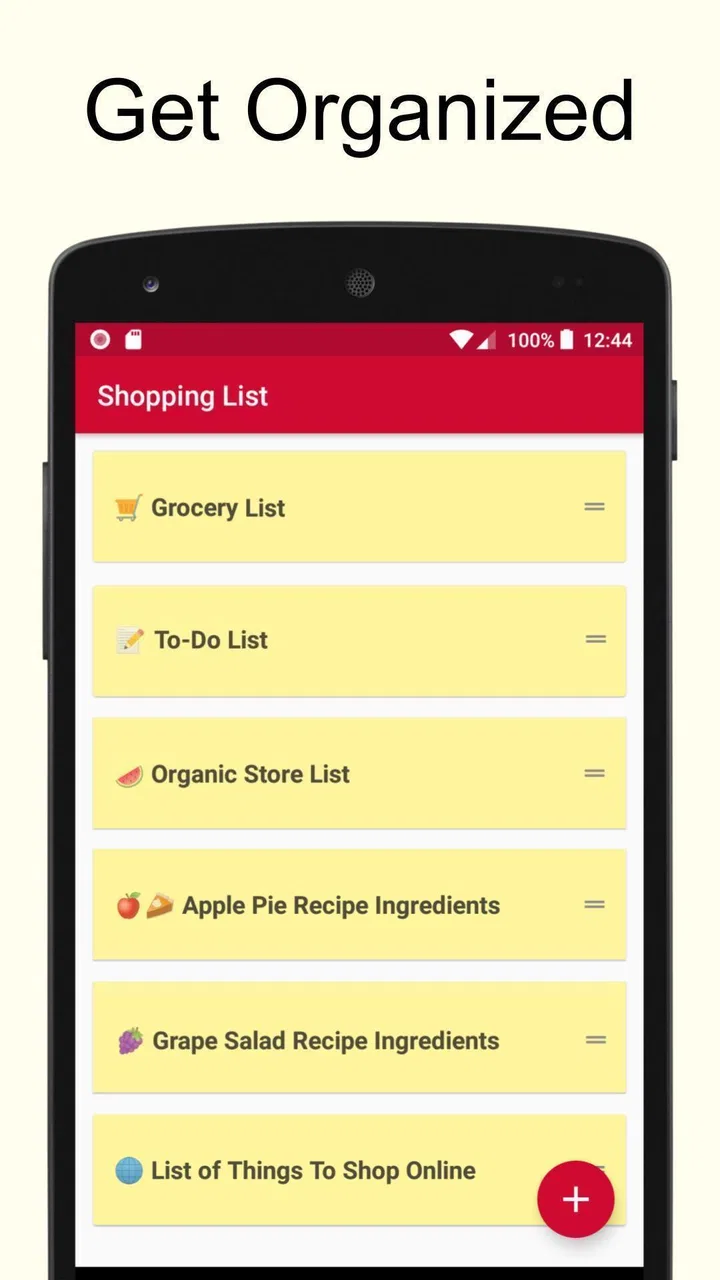
Yes, the app supports multiple lists, letting you organize your shopping by store, occasion, or any other category you prefer. You can also categorize items within each list to streamline your shopping experience and find products more easily when you're in the store.
05Are there any in-app purchases or ads?
Shopping List - Simple & Easy offers a free version with basic features and includes some ads. There's also an option for a premium upgrade, which removes ads and unlocks additional features like cloud syncing and advanced customization options. This ensures a more streamlined and uninterrupted user experience.
Pros
- User-friendly interface
- easy navigation.
- Offline access for convenient use.
- Customizable categories for items.
- Supports multiple lists simultaneously.
- Quick item search functionality.
Cons
- No barcode scanning feature available.
- Limited integration with other apps.
- No cloud sync for list backup.
- Ads can be intrusive at times.
- Lacks advanced recipe suggestions.

Shopping List - Simple & Easy
Gallery